Event Communications, daily digests and more: What’s new in TidyHQ, early October 2026
We’re always working to make TidyHQ easier to use, so your organisation can spend less time on admin and more time doing its thing. Here’s what’s new.
📣 Event Communications: keep ticket buyers in the loop, automatically
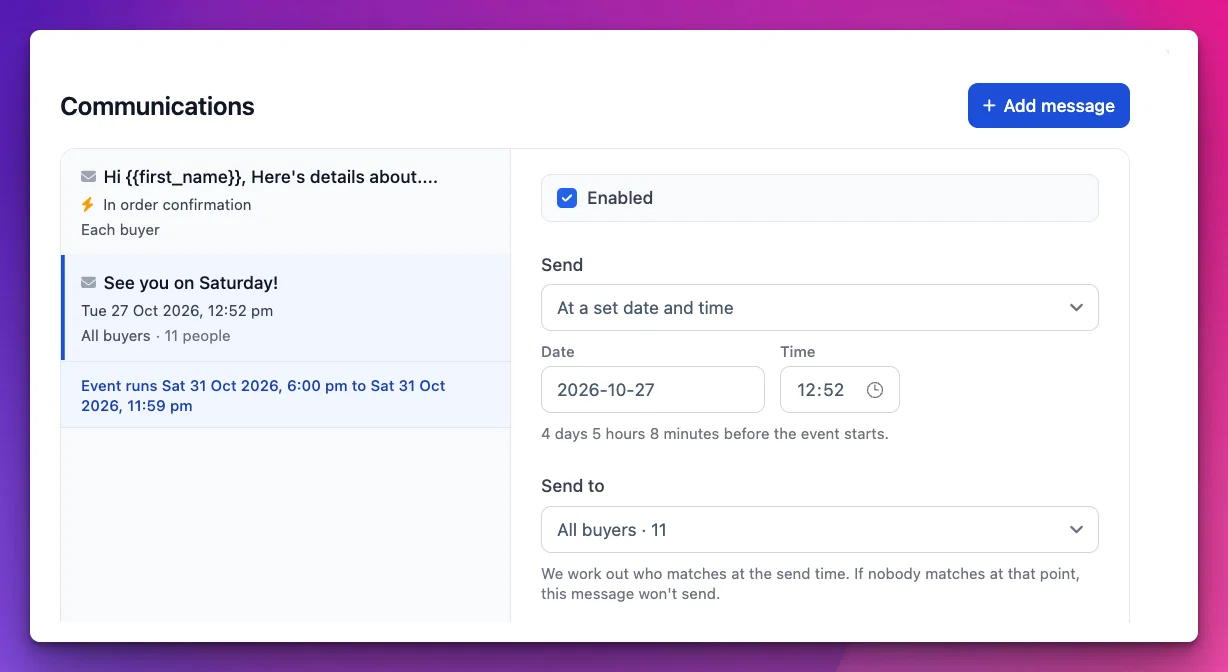
Every Event now has a Communications tab, so you can plan all the messages for an Event in one place and let TidyHQ send them for you.
- Schedule messages ahead of time. Write a reminder now and choose when it goes out—say, two days before the Event. Send it to all ticket buyers, only those who have checked in, or those who haven’t (perfect for a “we missed you” follow-up). Booked for a group? The buyer gets one message, and a merge tag can list everyone in their booking.
- Email or SMS. Send by SMS where it matters most, with an optional email fallback for buyers we can’t reach by text. (SMS needs Two-way SMS.)
- Add to the purchase confirmation. Include extra details—parking, what to bring, a dress code—in the order confirmation email everyone receives when they buy a ticket, or only buyers of a particular ticket type.
- Reuse what works. Duplicate a message, preview it before it sends, add your email signature, and insert a saved email snippet.
Order confirmation emails also now include calendar details, so buyers can add your Event to their calendar in a click.
📬 Daily notification digest
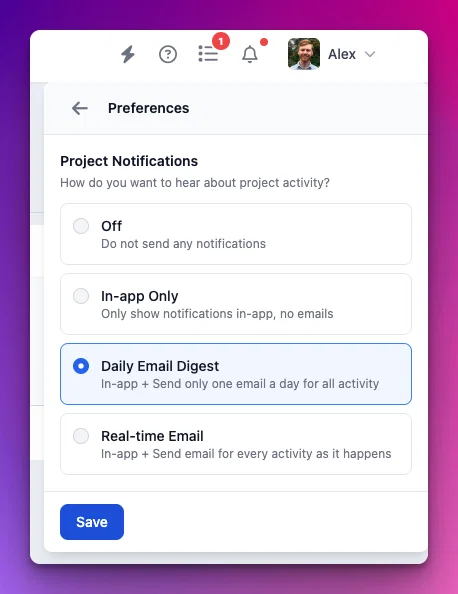
Admins can choose to get a single daily email summarising their Project and task notifications, instead of an email for every update. The digest groups notifications by type, with what’s due and what’s been assigned to you at the top, plus a link back to your notification inbox. The digest is now the default for admins, and you can switch to instant emails, inbox-only or off at any time from your notification preferences.
💬 Smarter, more reliable SMS
We’ve given SMS a thorough tune-up this month, so your texts cost what you expect and get where they’re going.
- No surprise costs. Curly quotes and dashes pasted from Word or your phone are swapped for plain ones automatically, so they don’t quietly double the cost of a message. If a character will still bump up the cost, the composer tells you before you send, and stops you before a message gets too long to deliver.
- Know your reach. Scheduled broadcasts now show how many people they’ll go to and what the introductory message will cost.
- More dependable two-way broadcasts. Two-way broadcasts respect your send limits, send the introduction and your first message together, and pick up safely where they left off if delivery is interrupted. A recipient with a 1300 or 13 number no longer stops the whole broadcast.
- A smoother inbox. The SMS inbox loads more conversations as you scroll, and the search box stays focused while you type.
💳 Better billing history and finance tools
Billing history now shows plan changes in your Organisation’s own currency. You can also view transaction fee history and download the related receipts, making reconciliation a little easier.
The Transactions type filter now includes the payment types that actually appear in your data, including Stripe where relevant. Event reporting also now calls net revenue “Estimated revenue”, so the label better reflects the figure being shown.
🐛 Fixes and small improvements
Events
- If you buy Event tickets on behalf of an Organisation, you can now choose yourself as an attendee.
- The Organisers filter on Event listings and analytics now starts empty (meaning “everyone”) and works like the other filters.
- Cancelling an Event session now reliably sends the cancellation email to everyone who was booked in.
- The attendee scanner now refreshes its check-in stats without swapping out the attendee list you were looking at.
Contacts
- Contact merge screens now show any linked login account, so it’s easier to keep the right one.
- CSV contact imports are now more forgiving with Contact Kind values, including capitalisation and the spelling “organisation”.
- New contacts without a name now show a person icon instead of a blank tile.
- Filters now display true/false values correctly.
Email and announcements
- Soft email bounces (like a full inbox) now pause sending for a day rather than a month.
- Bullet lists pasted from Word into announcements now keep their formatting.
- Text in the activity feed and the email inbox is now displayed safely, and the activity feed copes with activity types it doesn’t recognise.
Meetings, Projects and Tasks
- Meeting PDFs exported part-way through a meeting now include the tasks drafted so far, marked “(not yet finalised)”.
- Connected Organisations now get access to Projects as soon as our support team accepts the connection.
- The Tasks menu now uses the right wording when you have no tasks, one task or several.
- The @mention menu in notes now appears beside your cursor and stays visible.
Sign-in, settings and integrations
- Chrome, Edge and other Chromium-based browsers now reliably offer to save your password after you sign in.
- Bring Your Own Domain setup now handles long
TXTrecords correctly. - The Reddit social link now prefixes
reddit.com/r/rather than justreddit.com - Dropbox uploads that hit a rate limit are now retried automatically.
Look and feel
- The Notifications menu now lines up neatly under the bell.
- The active Project tab now sits neatly on its divider.
- The Contacts and Groups pages now use the standard page heading.
We hope these updates make running your organisation a little smoother. Your feedback is invaluable, so please let us know what’s working well or what you’d like to see next. Thanks for being part of TidyHQ!