Event filters, Project task discussions, easier sign-in and more: What's new in TidyHQ, June 2026
We've shipped a busy round of updates focused on clearer communication, smoother admin workflows, and fewer interruptions when you're getting committee work done.
More useful event and public-page controls
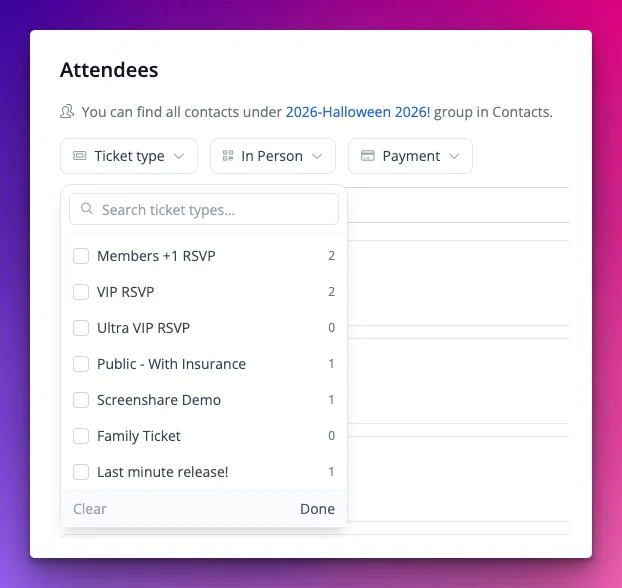
Event attendee lists now include improved filters, including filtering by ticket type. Admins also get clearer transaction and invoice links from attendee-related payment actions.
Public pages picked up a few practical improvements too: Contact Us pages can now include editable description text, and clubs can choose how many upcoming events appear on their home page.
Easier sign-in
Magic-link sign-in now gives the link top priority in one-time code emails and opens a confirmation page before consuming the token. That helps stop email security scanners from using the link before the real person gets to it.
One-time code sessions now last 30 minutes, giving members more breathing room to complete sign-in.
Finally, login emails with uppercase letters or accidental spaces are now handled more reliably.
Admin navigation has had a tidy-up
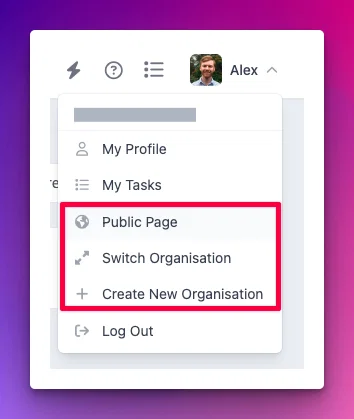
A fresh coat of paint has been applied to the admin controls. The left sidebar is now collapsible and the main content section can now be wider.
In particular, the Public Page, Switch Organisation & Create New Organisation options all now are located in the top-right in your user menu, rather than in the top-left.
🧩 Connect improvements
For Connect customers, we've made a series of updates to help peak bodies and local organisations work together with less manual follow-up.
Two-way SMS early access
We're beginning an early-access rollout of two-way SMS, starting with selected Connect customers.
For participating organisations, TidyHQ can now support Twilio-powered club numbers, SMS broadcasts, replies, conversation management, and more reliable opt-out handling.
This update also includes number rental, per-club billing, regulatory registration support for Australia and the UK, and the groundwork needed to keep SMS conversations tied back to the right contacts. We hope to make it more widely available soon!
Storage is easier to share, sort, and come back to
We've continued improving Connect Storage sharing this month. Parent organisations can share files and folders with child organisations, shared files now have clearer "Shared with us" handling, and Storage has a cleaner interface for uploads, folders, moving files, sharing, and quota warnings.
We've also added starred files, so admins can mark important documents and get back to them quickly.
Announcements are clearer before you press send
Announcements now show clearer audience labels and stronger warnings when a message will notify every administrator. That gives you a better chance to review the audience before a big send, narrow the message to a communication category, or switch to a smaller group of organisations.
For parent/child organisation setups, announcement labels and read states are also clearer, including "Read by you" on mobile.
Project discussions now support mentions and media
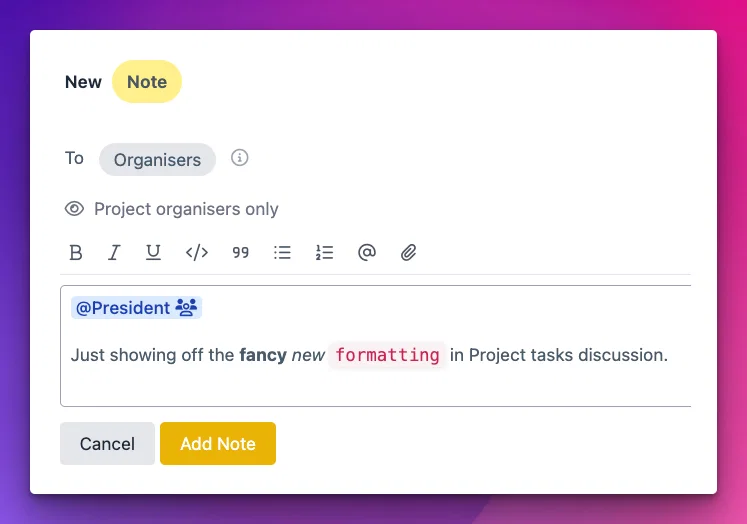
We've rebuilt the Discussion tab on Project tasks around a proper rich-text editor. Now collaborating on a task feels less like leaving a sticky note and more like a real conversation!
What's new:
- Rich text — bold, italics, underline, quotes, code, and bulleted/numbered lists (with Markdown shortcuts as you type).
- @Mentions — mention members and roles to pull them into the conversation. Hover any mention to see an identity card, and the people you mention get notified in-app and by email. In connected (peak body) projects, you can mention members from your connected organisations too.
- Images & videos — attach files by clicking the paperclip, dragging them onto the composer, or pasting straight from your clipboard (up to 10 MB each).
- Copy link to any message — share a direct link that takes a colleague straight to the exact message, highlighted in the thread.
- Attachments are kept in your Archive under Project, and anything uploaded but never sent is tidied away automatically.
More info in our Help Centre:
https://support.tidyhq.com/en/articles/15653329-discussions-in-projects
🐛 Fixes
- Event ticket scans from Codereadr now write to the newer scan tracking model on first scan, keeping scan history more consistent.
- Event ticket overview pages now behave correctly after a ticket pack is cancelled.
- Event checkout now handles an empty quantity field without causing an error.
- Admin-created memberships now support uploading a Profile Photo, matching the public membership flow.
- The auto-renew badge wording has been tweaked from "Automatically Renews" to "Auto-renews next time", so the wording is clearer before the first renewal.
- The Meetings API (v1) now respects private-meeting permissions correctly.
- Group contact lists now remember selected columns more consistently.
- Guest checkout no longer creates empty
contact.createdwebhook events - Existing member images are handled more safely during the newer sign-in flow.
- Task panels now allow scroll chaining back to the page, making long panels less frustrating to use.
- Date-picker controls in meeting tasks no longer appear underneath the clear button.
- Inbound email loop protection has been improved for club role addresses.
- Public shop pages now handle Meta/Facebook browser requests more reliably.
- Feedback form attachment handling now rejects invalid non-file attachments without crashing.
As always, your feedback helps us choose what to improve next. Thanks for sharing what is, and is not, making committee life easier.