Smoother Events and better-connected meetings: What’s new in TidyHQ, late October 2026
This release makes it easier to register for Events, understand who an announcement will reach, and run meetings with the conferencing account that belongs to the person organising them.
🎟️ A refreshed Event checkout
Event registration has a clearer step-by-step checkout, helping buyers choose tickets, provide attendee details and complete payment with less guesswork. The Register button now explains when a ticket needs to be selected first, and Event locations display cleanly rather than showing escaped address text.
This makes checkout easier to follow on smaller screens too, while preserving the Event and ticket options your organisation has set up.
🎥 Connect your own Zoom or Teams account for meetings
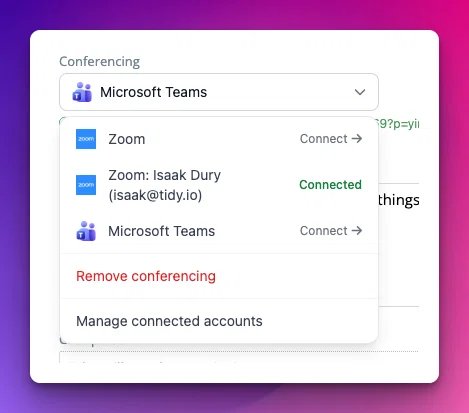
Each administrator can now connect their own Zoom or Microsoft Teams (new!) account and use it when setting up a meeting. The meeting editor lets you choose, replace or remove the conferencing link using your account, instead of relying on a single organisation-wide Zoom connection.
Connections are managed from your profile and remain private to their owner. Existing Zoom connections will need to be reconnected under the new per-person arrangement.
O365 Intergration & Teams for meetings
As a not for profit, we have o365 and use teams in particular for meetings. Would love to have Teams integration (either from TidyHQ OR an email address we can send to that logs the meeting in TidyHQ), as our organisation does not want to have Zoom in addition to Teams.
2
🏉 PlayHQ integration for leagues
Leagues using PlayHQ can now connect their organisation, choose a season and grades, then import and keep player information in sync. TidyHQ creates useful groups for grades and teams, adds fixtures to the dashboard calendar, and shows relevant PlayHQ details on each contact.
For Australian Rules football, player stats such as goals, behinds and votes can also be synchronised. We're hoping to bring other sports in soon - perhaps you will be the first. 😊
This feature is in early access, so please let us know if you'd like to be involved! Just email support@tidyhq.com and we'll work with you from there.
📣 TidyConnect: See exactly who an Announcement will reach
The audience summary for an Announcement can now open a recipient list before you send. It groups recipients by organisation and role, so you can check that the right people will receive the message.
Draft announcements are now fully editable too: update their audience, notification options and response settings, save the draft, then share it when it is ready. Editing a published announcement now saves its content without trying to send it again.
📋 Projects: a fresh coat of paint
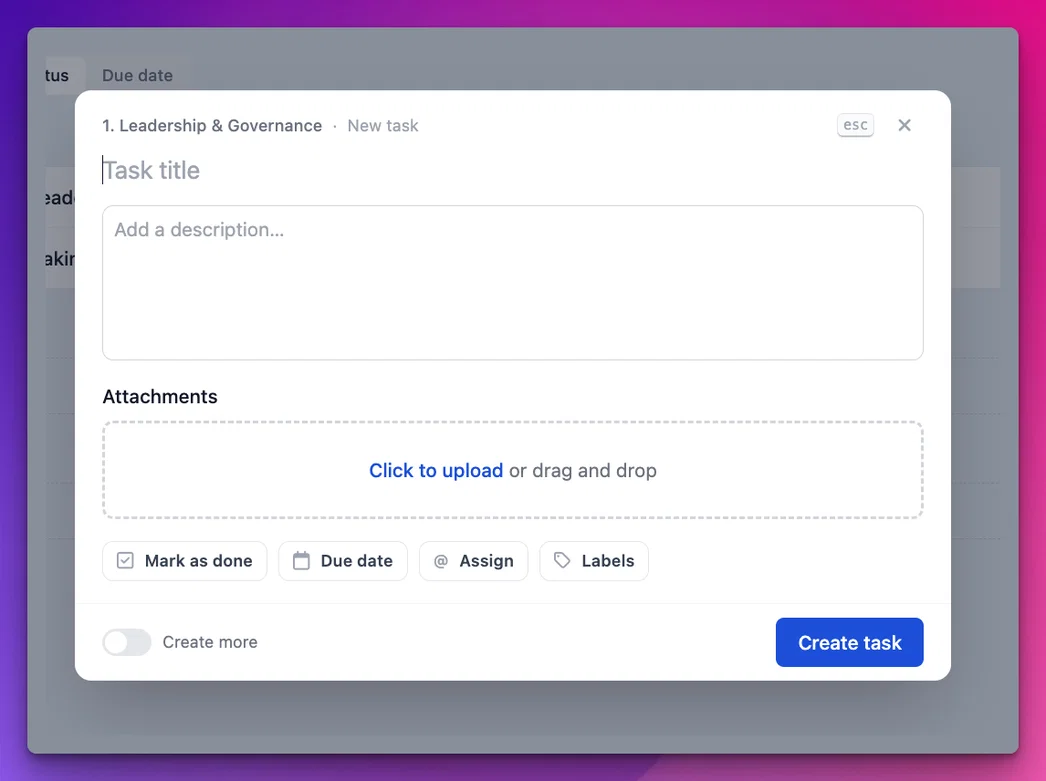
Internal Projects have a new task-creation modal. Enter the title straight away, move through the controls with Tab, and press Cmd/Ctrl+Enter to create a task; the existing slide-over remains for viewing and editing.
Type a natural due date such as “fri” or “2 weeks”, search for assignees and labels, choose a clearer task kind, and keep the modal open to add several tasks. The layout is also easier to use on mobile, including a full-width New task button.
🐛 Fixes
Memberships, Contacts and Groups
- When a member changes level, you can now prevent them from receiving expiry notifications for their old level. Turn on "Don't send expiry reminders if the contact has another active membership" in Memberships > Settings.
- Contact CSV imports now read custom date fields more reliably and explain unreadable values in the import log.
- Shared Groups now show the source organisation in the Groups list, making identically named Groups easier to distinguish.
- The merge-contact form no longer suggests the primary contact as a record to merge into itself.
Meetings
- Agenda items assigned to a role now "snapshot" the person in the role, so future role changes won't result in next year's President leading this week's meeting.
- Dealt with an issue where the editor wouldn't launch, and prevented that from happening again.
Email and reliability
- Soft bounces no longer pause email delivery at all; genuinely invalid addresses are now treated as hard bounces.
- Dropbox backup jobs now stop retrying when a file-versus-folder path conflict makes the upload impossible.
- When creating a new organisation, accented letters like
éare no longer dropped from the suggested URL but converted to their unaccented equivalent.
As always, your feedback helps us choose what to improve next. Thanks for sharing what is, and is not, making committee life easier.