What's new — April 2026
A fresh coat of paint, new Meetings, bulk-update for Membership messages, invoice attachments, social preview, bug fixes...
🗓️ Meetings V2 is now on for everyone
After rolling out on an opt-in basis, our redesigned experience is now on for all new meetings.
This has been a big upgrade technically, featuring collaborative editing with auto-save, as well as introducing agenda notes.
If you've been waiting to try it, now's the time.
🎨 A fresh coat of paint for Web Pages and Shop
We're giving the platform a significant visual refresh, starting with the public Web Pages.
A few highlights:
- Accessibility and SEO scores have improved — faster page loads and better metadata for search engines and link previews.
- On mobile the menu now acts as a drawer, making navigation super clear.
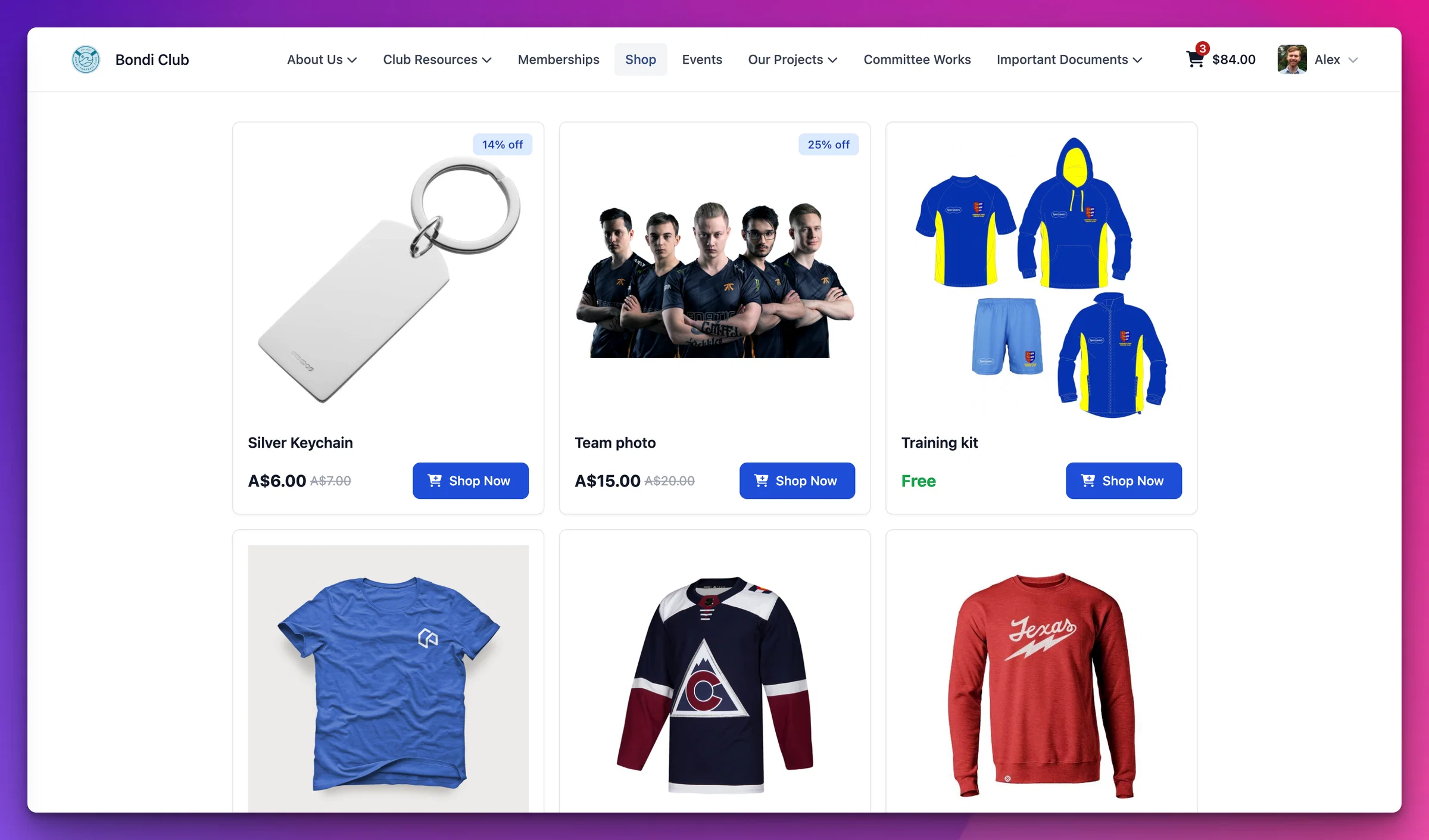
The Shop has seen some particular improvements on both the public shop listing and the checkout flow.
- Browsing is better: Product cards, the product detail page, and cart interactions have been updated with a cleaner layout and smoother updates when you add or remove items.
- Checkout is cleaner: The checkout flow has been restructured with a clearer step indicator, distinct identity states for members, guests, and connected accounts, and a tidier address and shipping section.
📋 Update membership level messages in bulk
Every membership level has five different messages: Welcome, Renewal reminders & success, Expiry notification and reminders. If you have multiple levels, you’ve always had to update them all one-by-one.
We've added a new tool in the membership level settings that lets you apply a change to some or all levels. This is handy when you need to refresh your welcome message, update seasonal information, or apply a single change across all your membership tiers without editing each level individually.
Just click on “Optionally update existing Membership Levels” and choose which levels to update before clicking Save.
Membership Messages - option to reset to default
Over the years a membership message (i.e. a welcome message) might be edited to include time-specific information, e.g. "Meetings for June 2017 are at {time}, {place}". For one reason or another this edit might be made at the default level, or that of a specific membership level to include level-specific information. If the level-specific information is no longer relevant, the message could be "reset" to the default by copying in the default text. But when the default changes, the level-specific text doesn't. If a club has many membership types (e.g. for {Adult, Concession, Student} x {Year, Semester, Month}) and has been using Tidy for a while, these changes accrete and it's a real paper-cut updating them all, possibly several times each year.
0
🙌 More small improvements
- Magic links now auto-mark Announcements as read — when a member opens an announcement via a magic link, it's marked as read straight away so your engagement stats stay accurate.
- The Rejections screen in Communicate is about to get a re-work as Email Health. If you already use it, we’d appreciate your feedback - and then we’ll make it easy to find for everyone.
- Invoices have long supported attachments, and now they’re included on the public-facing invoice too so that both sides of the conversation can see the supporting documents. We’ve also spruced up the graphic design of the invoice a touch.
🐛 Fixes
- An infinite loop that could occur when signing in with a one-time code via in-app browsers (e.g. Facebook, Instagram).
- An issue where non-admin users could see events that should have been restricted.
- A bug where deleting an agenda item in Meetings wasn't also soft-deleting its child subtopics.
- A currency symbol fallback so shops in certain regions display the correct symbol.
- Exceptions that could occur when generating digital wallets (Apple/Google Wallet passes).
- A bug in the OAuth flow where a contact record was created too early, before the authorisation was confirmed.
- Facebook and other social link previews — club logos now use a larger image size that meets the minimum dimensions required for preview images.
- Cleaned up several Announcement feedback edge cases to make the experience more reliable.
As always, your feedback helps us decide what to tackle next — thanks for sharing it.